


4-Step Guide to Mastering Keyword Research [Free Tools]
- Kriselle Gonsalves
- Jul 1, 2020
- 13 min read

Updated: Jan 2, 2021
Keywords.
These tend to get marketers a little hot under the collar.
Think of keywords as a bridge that transports weary travelers to your site.
Keywords are crafted based on the user’s search query (i.e. what the user types into Google).
Let's say your website is highly visible for the right keywords (AKA ranks on the first page of Google), you have a strong bridge from the search engine to your site!
This is why it's incredibly important to have a formidable keyword research tool kit.

Way back when SEO was still in its infancy, most people would turn to Google Keyword Planner, pick high-search-volume keywords, and slather them (generously) on their site.
Times have changed.
Google's algorithm has advanced so dramatically, it now hyperfocuses on search intent, content quality, website authority, keyword relevance, and a laundry list of other factors - all in an attempt to improve user experience.
*record scratch*
Let’s back it up.
In this article, I cover some valuable keyword research tips - stuff that you can use if you're a complete rookie with no clue where to begin.
Psst! I also point you in the direction of some free SEO keyword research tools.
Here we go!
Step #1
Keywords 101: Exploring the Basics

What are keywords?
Simply put, keywords are the cornerstone of your marketing campaign.
These are phrases that marketers use on their pages to rank higher on search engines.
It's important to speak the same language as your audience, meaning, you need to understand what your target audience is typing into Google.
This gives you a strong indicator of the phrases around which you must optimize your content.
But first, a crash course on the types of keywords out there:
Short-tail (seed) keywords:
Usually three words or less, seed keywords are super broad and correlate to your core products or services;
fur coats
golf clubs
digital marketing
etc.

As you've probably guessed, they’re usually very competitive to rank for.
Short-tail search queries are generally used by people researching a topic they know very little about.
That is to say, these keywords aren’t typically used by people who are in the buying mindset.
Long-tail keywords
Over three words. Eg. “digital marketing services for small business”.
This gives you a very clear idea of what the user is looking for, making it easy to pinpoint their intent.
Google's autocomplete feature is a great way to tap into long-tail keyword ideas that people are actively looking up.

Remember, intent-rich keywords are phrases that capture people who are on the verge of making a buying decision!
LSIs (Latent Semantic Indexing) keywords (LSIs)
Semantic variants of your main keyword. Let’s say your main keyword is “best chocolate fondue recipe”.

The benefit of using LSIs in your content is simple really.
It helps you capture all semantically related search queries, ensuring no query falls through the cracks.
A great tool to find LSIs? LSIGraph!
Stick around. I explore this tool below and find some pretty interesting information.
Short-term keywords
These burn bright and fade fast. Eg. “movie reviews for The Hunger Games”.
This type of keyword will create explosive traffic for your website, only so long as the movie is in theaters.
Following that, these get relegated to the back burner and don’t serve your website long-term.
Long-term keywords
Evergreen keywords that generate consistent traffic over time. Eg. “cheap auto windshield repair shop”.
These keywords are rooted in your core business services and do not have a shelf life.
Geo-targeting keywords
These have a location included to attract the most relevant customers in close geographic proximity, Eg. “dental teeth whitening services in Toronto”.
This is a very valuable type of keyword for local businesses that offer services within a certain radius.
Quick recap!
Search queries indicate what your audience cares about.
You need to optimize your website with keywords crafted around these search queries - i.e. speak the same language they speak.
This is why keyword research is the raison d'être for the modern-day marketer!
Now that you know what they are, let’s find out how to generate a valuable keyword list for your website!
Step #2
Generate Your First Keyword List

You know your business better than anyone else.
Let’s start there.
Make a list of the following:
What are your core products and services?
What is your value proposition?
What terms do existing clients use to describe you? (have a chat with them!)
What kind of content are your competitors using (check their Home, Services, Products, About sections)
At this stage, we want the ideas to flow freely. Don’t nitpick! I made the mistake of doing that, and it took me forever to get a good keyword strategy off the ground.
These initial ideas will inform our SEO keyword strategy later on.
Once you’ve answered the above questions, write down broad keyword ideas in a Google docs sheet.
For example, my website is geared toward two things;
Freelance writing services
A (super awesome) digital marketing blog
This is how I would answer the above questions:
1. My core services:
SEO freelance writing
Content writing
Copywriting
Social media management
Lead generation
Blogging
2. My value proposition:
Conversion-friendly SEO content
Quick turnarounds
Metric-based results
Affordable hourly rates
3. What my clients say:
Amazing writing skills
Great intuition for effective SEO strategies
4. Phrases my competitors use:
Content writing in Toronto
Inbound marketing
Website writing services
Content writing services pricing
Article writing services
A question I often get asked; How do I find my competitor’s keywords? To find what phrases your competitors use, simply look at their menu items, service areas and any words attached to their location (in this case Toronto).
We’ll go over competitor analysis in detail a little later on.
For now, throw these all together…
And here’s what my initial seed list looks like:
Content writing services
SEO copywriting services in Toronto
Graphic designer in Toronto
SEO marketing blog
Freelance blog writer
Social media management services
Website writing services
Inbound marketing techniques
Affordable content writing services in Toronto
...and with that, you should now have a seed list of keywords that speaks to your brand.
I added in Toronto because, when I’m first trying to get my website to rank, it’s impossible for me to rank well all over Canada and in the U.S.
Walk before you can run.
I first need to build a reputation in Google’s eyes.
Here, I’m choosing to start locally, and once my pages rank well in Toronto, I'll strategically expand!
Step #3
Free Keyword Research Tools

Google Keyword Planner.
You've probably heard of it.
You've probably even been led to believe that it's the be-all-end-all keyword research tool.
Okay, Google Keyword Planner is a pretty awesome, but you do need to create a Google Ads account to use it.
So let's get to the million-dollar question; How do I do free keyword research?
There are several other ingenious keyword research tools that you can turn to for free - without the extra steps!
Neil Patel is the Messiah for digital marketers everywhere. Here’s one tiny reason why.
His free keyword research tool, Ubersuggest is taking the industry by storm.
Why do I like it so much?
Firstly, it’s a super simple tool that helps you locate highly relevant keywords for your website. All you have to do is type in a keyword (or a domain) into the search field and voila!
I typed in “SEO marketing tips” into Ubersuggest.
Among other useful info, I can now see insights about that keyword like Search Volume, SEO Difficulty, Paid Difficulty and Cost Per Click.

Pretty neat, eh?
It gets better.
Scrolling down, I can also see a list of keyword ideas broken down by monthly search volume!

Ubersuggest also reveals the websites that rank well for this keyword, along with the number of backlinks and social shares.

The best part?
It also helps you silently creep on your competitors and check out what keywords they’re ranking for.
The verdict?
Ubersuggest is a sure-fire way to generate a list of keyword ideas that connect you with the right search traffic.
Yes, the mega-huge search engine, that Google.
Why not research keyword ideas on the same place you’re trying to rank?
Here are a couple of quick ways you can do that.
Autocomplete
The simplest way to generate a ton of keyword ideas?
Just start typing a topic into Google.
For example, “toothpaste”.

Instantly, you’re treated to a list of search phrases.
Google suggests ideas based on what’s relevant, i.e. what people are actively searching for.
This means you just scored yourself a bunch of high-volume keywords that are relevant to your original topic.
Related searches
Let’s go with the keyword, “whitening toothpaste”.
Scroll to the very bottom of the search page.

You’ll see a list of related searches that you can scrape great idea ideas from! Yes, it’s that simple!
People also ask
The future of marketing is dominated by voice search.
This means you’ll have more and more people feeding “question” searches into Google, rather than regular word snippets.
On Google search, for almost any topic, you’ll see a list of questions that users most frequently look up.

This is a strong indicator of the types of topics that are popular amongst your target searchers.
Feel free to scrape keyword ideas from this list of questions.
On that note, incorporate questions themselves into your content to capture this segment of your audience.
Forums
Niche-specific forums are a wonderful space to find what users are interested. It’s also a great way to check the recency of their interest.
Roll the example.
I Googled “dog food forums”.
And clicked on the very first result.
Just by scrolling through the list of topics I see a bunch of keyword ideas that have potential:

Based on the number of views and comments these topics drew in, you already know that it’s something a ton of people are interested in.
Likewise, check out a couple of other forums and shortlist a few keyword ideas that fit well with your brand.
More on that below!
An ill-tapped resource for great keyword ideas; Wikipedia.
Hear me out.
Wikipedia is a giant database of useful information about almost any topic under the sun; it’s a crowd favorite and Google knows it.
That’s why, when you Google a certain topic, Wikipedia isn’t far from the top, if not at the #1 spot.
Here’s how you can use it to scrape keyword ideas.
Let’s visit the Wikipedia page for “website content writer”.
You’ll notice a couple of interesting things.
Firstly, there are several links throughout the page that indicate popular terms related to your search term.

Secondly, you’ll see a table of contents that summarizes the key points on the page - another ingenious source of keywords!

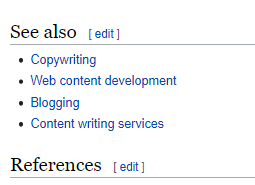
Thirdly, you’ll also see a “See Also” section at the bottom which gives you further insights into related topics that are equally popular with readers.
How can you use these three things to your advantage?
Connect all the dots and generate a great keyword list.
Here’s a keyword list I drummed up from this page alone;
SEO online writers
Copywriting services
Proofreading services
Fact-checking services
Social media optimization services
Writing whitepapers
Social Media
Socials are where your audience lives!
You’re a few simple searches away from finding out what people are saying about your brand and your industry.
On Twitter and Instagram, you have the option of searching by trending topic. This is a huge time-saver and helps you quickly find ideas that your audience can’t get enough of.
Let’s say you’re writing an article about the best sports shoes for tennis players. On Twitter, for instance, you can find information about:
Trending brands and shoes by hashtag
Search query recency and volume
Audience demand for sports shoes at this time
What your competitors are doing to feed the demand (articles, podcasts, promos)
Again, don’t reject any ideas at this stage. Later on, we’ll learn how to sieve this keyword list to get the best ones.
This is an ingenious Chrome extension that you can use for free.
Once you’ve downloaded it, your search engine results page will be transformed - now geared to show you a list of related searches, monthly search volume and CPC.


It pulls relevant search volume data in real time from Google, YouTube and Bing, giving you the most holistic picture of the best keyword phrases to use.
We already touched upon LSI Graph in step one.
Quick recap: LSIs are semantic keyword variants, meant to help you capture related search queries of your main keyword phrase.
So, for example, if our main keyword phrase is “noise-canceling headphones for sale”, possible LSIs would be:

Now bear in mind, there are some irrelevant LSIs that draw in irrelevant traffic, AKA people who are looking for something completely different;
Noise-canceling sleep mask
Noise-canceling earplugs for sleeping
Bose noise-canceling headphones
Carefully select the right LSIs that match your key demographic's search query.
Step #4
How to Choose the Right Keywords

There is no one-size-fits-all-list...
However, there are some key factors you can take into account.
The following factors will help us measure Keyword Difficulty.
Keyword Difficulty indicates how hard (or easy) it is to rank for a given term on organic search results.
There are a couple of inventive ways to check the difficulty of a particular keyword phrase - for free!
Keyword Search Volume
This refers to the number of people searching for this keyword in a given period (usually shown monthly on most keyword tools).
Why is this important?
It gives you an idea of one major factor; How many people care enough about this topic to look it up!
After all, you wouldn’t want to target a keyword that doesn’t have the capacity to drive traffic to your website, would you?
On the flip side, if you’re a brand new website, targeting a high-volume keyword (which usually means it’s highly competitive) could work against you.
Again, walk before you can run.
When trying to rank a new website, use keywords that balance high search volume with low competition.
What qualifies as high search volume? This really depends on your industry.
For instance, in the IT world, the term “IT support company” generates a monthly search volume of 590 as seen via the Keywords Everywhere extension.

Whereas, on the lower rung of that same ladder, the term “IT cloud services” generates a monthly search volume of 170.

Let’s look at another example.
In the criminal defense law world, the term “criminal defense lawyer” generates a monthly volume of 9,990 searches.

Looking at a lesser searched term, “DUI attorney near me” generates a monthly search volume of 2,900.

As you can see, it’s hard to give you an exact figure of what the “perfect” search volume is.
Take into account the other relevant keywords in your industry AND how new your website is.
Newer websites naturally take longer to rank for competitive keywords.
Even if you were to try to rank for these, you would most likely make it to the 4th or 5th page of Google at the most.
Domain Authority
Let’s explore Domain Authority and why it should factor into your keyword strategy.
Domain Authority is a score from one to 100, one being abysmal and 100 indicating a very reputable site.
DA grows over time as you:
accumulate high-quality backlinks to your website
produce high-quality content
improve user experience
use effective on-page SEO strategies
This score indicates the likelihood that that website will rank for keywords in your niche.
The higher the Domain Score, the more likely it is to rank well.
To check the average Domain Authority of high-ranking websites, I suggest installing Neil Patel’s (totally free) Ubersuggest Chrome extension.
Let’s look at an example!
Here, I’m looking up the keyword “buy GMO-free hand sanitizers online”.
Ubersuggest tells me that the websites ranking on the first page for this keyword have an average DA of 70.

If you’re a brand new website, targeting this keyword (and trying to rank well for it) will be somewhat of a fool’s errand.
Now, let’s look up “organic 100ml hand sanitizer for children”.
The Domain Score is 51.
Slightly easier to rank on the first page as the competition isn’t as high up the ladder.
If you notice several big brands taking up the first page; Pinterest, Etsy, Wikipedia, etc. it may not be a viable keyword to target at this time.
Bear with me.
Besides Domain Authority, there are a few more factors to consider.
Page Authority
The above doesn’t give us the full picture. Remember, Google ranks web pages and not websites as a whole.
So while the domain’s reputation and authority does influence rankings to a certain extent, each page has to prove its individual worth.
Let’s check the Page Authority. I suggest installing the MozBar for Chrome.
Here, you can see that for the keyword, "organic 100ml hand sanitizer for children", Page Authority averages at around 25.

This indicates that it is very possible to make it to the first page even without a very high Page Authority.
Competition
How many pages (or search results) are actually competing for a certain keyword?
Let's find out.
Here, I typed in “custom sheet metal re-roofing”.
My first move is to look at the Domain Authority of websites that are already ranking for this keyword.
The Ubersuggest extension tells me that the average domain sore for this keyword is 12 - super low, very achievable to make it on the first page.

Then I look at the number of results that show up; in this case, over 10.8 million. Those are a lot of pages trying to rank for that keyword, however, the DA is a positive indicator.

Remember, no one factor (in isolation) should influence your decision on what keyword to target.
Link Analysis
Let’s perform a Link Analysis of the websites ranking for that same keyword; custom sheet metal re-roofing.
MozBar tells me that these pages have between 0 to 27 link.
This suggests that it's a viable keyword to target and rank on the first page for even with 0 backlinks.

Let’s click the Link Analysis icon for the site with 27 backlinks.

This is a great way to get an idea of the quality of links your competitors are working with. Remember, it’s even possible to reach a high DA and PA, with low-quality spammy links.
You can check the Spam Score for each Linking Domain (Referring Domain).

Anything above 30% indicates a high spam score.
If you notice a lot of high-quality referring websites, eg. Toronto Sun and HuffPost (sites with a high Domain Authority), you may not want to target the keyword just yet.
Cost Per Click (CPC)
CPC is an indicator of how much the competition is willing to bid to have their ad show up for that keyword.
It can also be a pretty useful tool for organic keyword research.
Let’s find out how.
I typed in, “blog writers”.
The Keywords Everywhere tool shows me a ton of valuable information.
In this case the CPC is $10.99, and the monthly searches are 2,900.

This tells me two things;
There's a decent amount of traffic looking this keyword up, however, advertisers aren't spending all that much to bid for this keyword.
This means there's not a lot of commercial intent for this particular keyword.
Let's look at another example.
I typed in, "content writing services".
Here, the CPC is much higher; $14.93 with an average of 1,300 monthly searches.

This keyword has a much higher commercial intent, which, in a lot of cases, indicates that people looking this keyword up and in the "buying mindset".
Organic CTR
CTR or Click-Through Rate is the percentage of clicks your page receives every month.
CTR = clicks / impressions
What is an impression? One impression is registered every time your website on the search results page loads on the user's screen.
Let's say 2,000 people look up the keyword "organic coffee beans" and saw your website on the search results page, and 20 people click on your page.
Your CTR = 2%
Understanding Organic CTR is important.
Why?
For one, it helps you identify how many clicks you're likely to get if you target that particular keyword.
The Keywords Everywhere tool gives you a glimpse into Organic CTR.

If you notice a huge number of clicks, rest assured, users are actively seeking information relating to that keyword.
If, however, you happen to notice the search results page filled with Google Ads, videos and Featured snippets, chances are, the Organic CTR for web page results is super low.

It may not be viable to target that keyword with a regular page.
Final Thoughts!

We made it to our journey’s end, folks.
I’ll leave you with a couple of important takeaways to close off this article about mastering the art of keyword research as an SEO rookie.
Define your value propositions; what do you offer that the other guys don’t. Based on this and a little preliminary competitor research, create your list of seed keywords.
Following this, find your “the perfect storm” of keywords with commercial intent, high traffic and low competition. There are no rules here, find out what qualifies as “high and low” in your niche.
If you’re brand new, start with long-tail keywords and rank well for those first. Also, look at other factors; Domain Authority, Page Authority and Backlinks of the companies already ranking on the first page.
Mistakes are your friend! We live and we learn. Don’t be afraid to get it wrong the first time and revise your strategy accordingly.
And with that, the floor is yours!
Did you find anything particularly useful in this guide?
What keyword research strategy are you most excited about?
Sound off in the comments below!

Comments